AYBN ERP — From Lead to Ledger — Everything Connected.
Connect sales, purchasing, inventory, GST, accounting and payments for your wholesale, distribution, trading or electronics business.
One connected system for sales, operations, finance and compliance.
- Leads
- Quotations
- Sales orders
- Deliveries
- Invoices
- Payments
- Accounting
- GST
- Analytics
- Inventory
- Purchases
- Customers
 One platformShared customers, items and books
- Orders pending delivery
- Invoices awaiting payment
- Journals posted
One transaction. One connected flow.
AYBN keeps the relationships between your transactions, so you can follow a customer requirement from the first enquiry through sales, delivery, billing, payment, accounting and reporting.
Step 3 of 9
Order
Record the customer order and see, line by line, how much is still to be delivered.
What moves on: Customer, items and the quantity still to deliver flow into delivery challans.
Leads and quotations are managed in CRM, and today the order is entered separately from the quotation. From the order onwards, each step is built from the one before, so nothing is typed twice.
Everything Your Business Needs. Connected in One ERP.
Sell Faster
Manage leads, customers, quotations and sales orders in one place, then follow every order through delivery and billing.
Control Operations
Run purchasing, inventory, production and deliveries from one platform. Service management is upcoming.
Simplify Finance
Invoices, payments, customer ledgers and accounting stay connected to the sales and purchases behind them.
Stay GST Ready
GST is applied as you bill, and GST reports are prepared from the same connected transactions.
Know Your Numbers
See sales, stock, receivables, payments and profit from records that update as your team works.
Make Better Decisions
Use one set of reports instead of collecting figures from spreadsheets and separate systems.
One ERP. Multiple Business Functions.
Sales, purchasing, inventory, finance, GST and reporting work on the same records today. Manufacturing and Service are on our roadmap and marked Upcoming.
Sales & CRM
- Lead management
- Customer management
- Quotation
- Sales order
- Lead follow-ups
Purchase & Inventory
- Purchase management
- Inventory management
- Stock tracking with batches and serials
- Delivery challan
- Stock visibility across stores
Finance & Compliance
- Sales invoice
- Payment management
- Customer ledger
- Accounting
- GST
Reporting & Analytics
- Business reports dashboard
- Sales reports
- Inventory reports
- Financial reports
- Performance analytics and ratios
Manufacturing
- Bills of materials and production orders
- Material issue, work in progress and finished goods
- Material cost correction with approval
- Cost traceability to supplier invoices
- Upcoming
Service
- Service management
- Job sheets and customer approvals
- Service tracking: engineers, parts and billing
Enter It Once. Keep Everything Connected.
A business transaction should not become a series of disconnected entries. In AYBN, each document carries its details forward to the next one: connected transactions instead of disconnected modules.
- Lead
- Customer
- Quotationnot linked yet
- Sales Order
- Delivery
- Invoice
- Payment
- Ledger
- Accounting
- GST
- Reports
- Lead → CustomerRaised for a customer from your customer list
- Customer → QuotationItems, prices and tax are added to the lead and printed as the quotation
- Quotation → Sales OrderNot linked yet: the order is entered separately, using the same customer and item records
- Sales Order → DeliveryCustomer, items and the quantity still to deliver
- Delivery → InvoiceDelivered items and quantities, from one or more challans
- Invoice → PaymentThe balance due on each invoice
- Payment → LedgerReceipts and invoices update the customer ledger
- Ledger → AccountingSales, tax and payment journals post automatically
- Accounting → GSTThe same tax amounts feed GSTR-1, GSTR-3B and ITC reports
- GST → ReportsProfit, dues, stock and GST in one set of reports
Less duplicate data entry
Customers, items and quantities are entered once and carried forward.
Fewer manual handoffs
Challans come from orders and invoices come from challans.
Better traceability
Invoices keep their links to the challans and orders behind them.
Faster billing
One invoice can carry several delivery challans.
Better financial visibility
Journals post as you work, so the books are current.
Consistent business data
Sales, stock, accounts and GST share the same records.
GST-Ready Business Operations
GST is built into the wider business workflow. Tax is applied as you sell and bill, posted to your books, and reported from the same figures.
- GST-ready invoicing, with the right tax for every state by place of supply
- e-Invoice (IRN) and e-Way Bill from the invoice, through a GST Suvidha Provider using your credentials
- GSTR-1 data with portal-ready JSON export, GSTR-3B and HSN summaries
- GSTR-2A/2B reconciliation and input tax credit eligibility, including Rule 42/43
- Tax posts to your books with the sale, so reports and returns start from the same figures
- GST return filing through an authorised provider
GST compliance is part of the ERP workflow — not the entire ERP.
See GST & Compliance- SalesOrders and deliveries for the customer
- InvoiceTax applied by place of supply
- GSTe-Invoice and e-Way Bill through your GSP
- AccountingOutput tax posts to the books
- ReportsGSTR-1, GSTR-3B, HSN and ITC
Know What You Have. Know Where It Is.
Every purchase, delivery and transfer moves stock in AYBN, by store, batch and serial number, so you can see what you have and where it is.
- Stock visibility by store, batch and serial number
- Purchase-to-stock: goods receipts and direct purchase invoices add stock by batch
- Sales-to-stock: delivery challans take stock out as goods leave
- Stock transfers between stores, with users limited to their stores
- Minimum stock levels and a stock valuation report for better stock decisions
- Physical stock counts and approved adjustments
- Purchase invoiceAdds stock with batch and costStock in
- Stock transferFrom one store to anotherMoves
- Delivery challanAgainst the customer orderStock out
Stock, kept by store
- Stock by store
- Batches and serials
- Minimum stock levels
- Stock valuation
Connect Every Sale to the Money.
Finance in AYBN is connected to real business activity. Every invoice and receipt comes from the sale behind it, and posts to the customer ledger and your books.
- Receivables and payables at a glance, with dues on the dashboard
- Payment tracking: receipts allocated across invoices, with advances kept
- Customer and supplier ledgers built from the same transactions
- Cash flow, cash book and bank book for a clear cash position
- Less reconciliation effort, because receipts are matched to invoices as you record them
- Bank reconciliation
- SalesThe order and its deliveries
- InvoiceWhat the customer owes
- PaymentOne receipt settles several invoices
- Customer ledgerEvery invoice and receipt for the customer
- AccountingJournals post automatically
Turn Business Data Into Decisions.
Owners and managers see the business in one place, instead of collecting figures from several systems. Reports are built from the same connected records, and can be exported to Excel.
- SalesSales registers and income analysis
- OrdersCompleted and pending orders
- OutstandingReceivables and payables
- PaymentsCash book and bank book
- InventoryStock valuation and minimum stock
- CustomersCustomer ledgers and dues
- GSTGSTR-1, GSTR-3B and ITC
- ProfitabilityProfit and loss, periodic P&L
- Business performanceRatios, balance sheet and fund flow
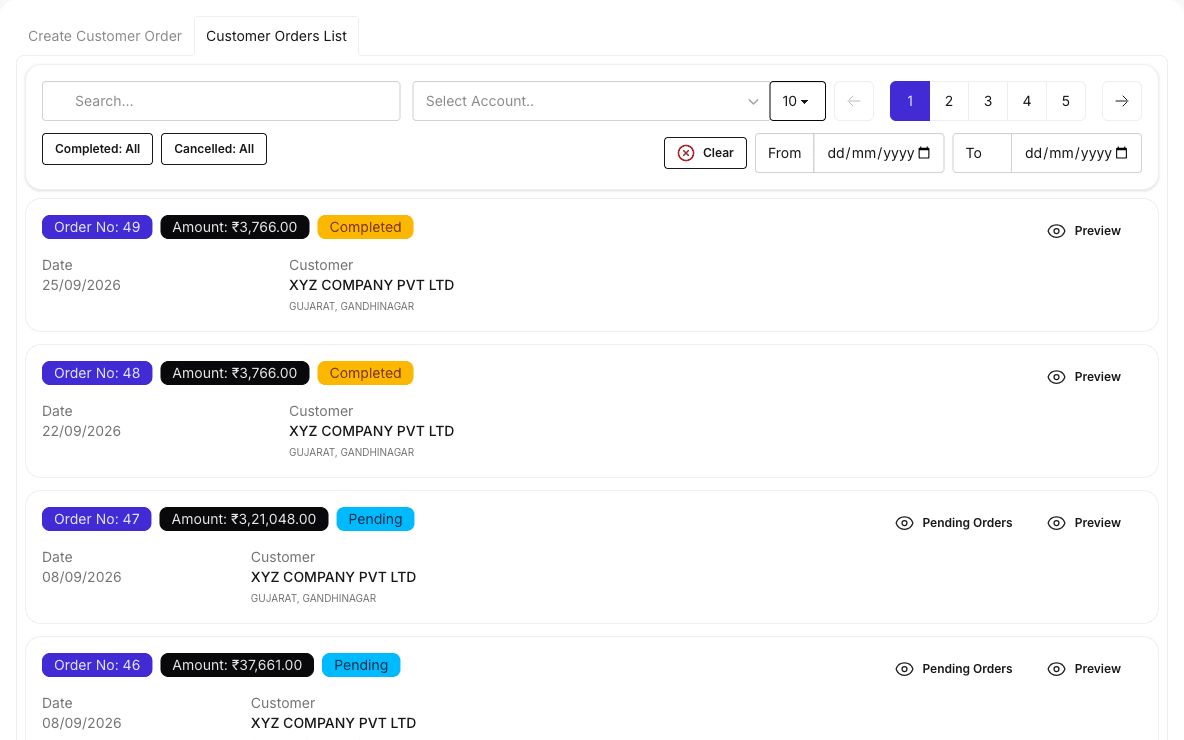
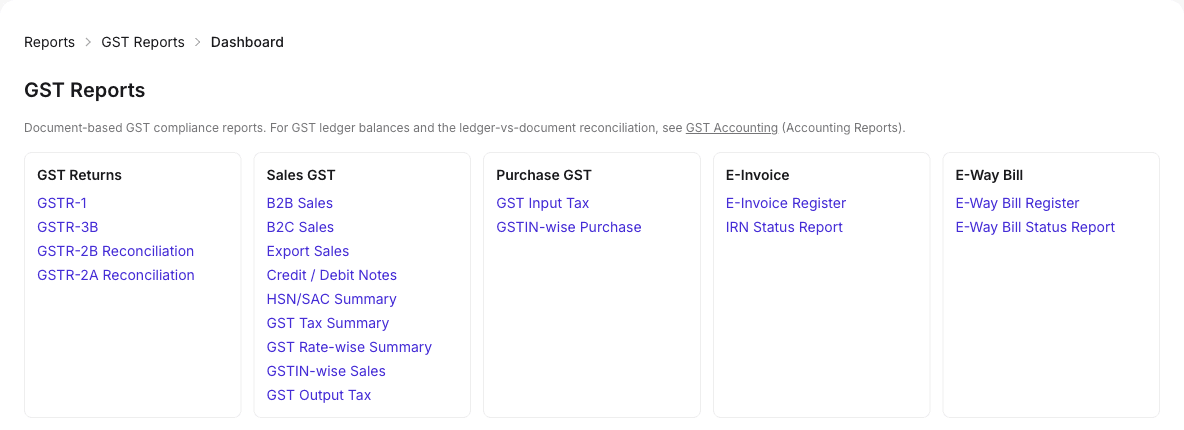
Real screens from AYBN ERP
Built for Reliable Business Operations.
Your orders, stock and books are business-critical. Here is how AYBN ERP controls who can see and change them.
Role-based permissions
Each role gets view, create, edit or delete rights per screen, checked on the server for every change.
Separate company data
Every company’s records are scoped to that company. Users of several companies switch explicitly.
Verified sign-up
New accounts verify their email address before they can sign in.
Login protection
Sign-in attempts and request bursts are rate limited.
Protected transaction records
Invoices linked to challans, and invoices with a generated e-Invoice IRN, are protected from edits that would break them.
Traceable documents
Invoices keep their links to challans and orders, and journals are posted from the documents that created them.
- Audit trail of business changes
- Approval workflows
Built for Growing Businesses
AYBN ERP is for growing businesses that have outgrown disconnected spreadsheets, billing tools, accounting software and separate operational systems, and want one system to connect:
- Sales
- Purchasing
- Inventory
- Manufacturing
- ServiceUpcoming
- GST
- Accounting
- Payments
- Reporting
A strong fit if you are
- GST-registered, mostly B2B, with credit customers
- Several people working in it: sales, stores, accounts and the owner
- One or more godowns, often with batches or serial numbers
- Orders delivered in parts, then billed and collected
Signs you have outgrown your tools
- Spreadsheets for orders, stock and dues
- A billing tool that does not know what was delivered
- Accounting software kept separately from operations
- Separate apps for enquiries, stock and payments
Using Tally Prime, BUSY or similar software?
Many growing businesses keep their books in accounting software such as Tally Prime or BUSY. Book a demo and we will walk through how AYBN ERP would fit your current workflow.
Tally Prime and BUSY are trademarks of their respective owners. AYBN ERP is not affiliated with them.
Why Businesses Choose a Connected ERP
Disconnected software
- CRMseparate
- Quotationseparate
- Orderseparate
- Inventoryseparate
- Billingseparate
- Accountingseparate
- Reportingseparate
Each tool keeps its own copy of the customer, the items and the amounts, so they are re-typed and checked by hand at every handover.
AYBN ERP: one connected business flow
- CRMshared records
- Quotationshared records
- Ordershared records
- Inventoryshared records
- Billingshared records
- Accountingshared records
- Reportingshared records
One platform and one login, working on the same customers, items and books, so the numbers agree from the first order to the final report.
Ready to Connect Your Business?
See how AYBN ERP can connect your sales, operations, inventory, finance and compliance in one platform.
Discover how AYBN can fit your business workflow.